December 31, 2025

Calorie tracking in 2026 isn't about writing numbers in a notebook anymore. The best apps now use AI to recognize your food from photos, sync with wearables to adjust your targets based on activity, and adapt your plan when you miss a day instead of making you feel like you failed.
This matters because consistency beats perfection. Apps that make logging easier and less tedious help you actually stick with it.
This guide covers the best calorie tracking apps for weight loss, weight gain, iPhone users, and free options. We tested accuracy, ease of use, and whether they actually help you build habits rather than just collect data.
Not all calorie trackers are equal. Here's what separates the good ones from the annoying ones.
A massive database means less manual entry. But size doesn't matter if half the entries are wrong. Look for apps with verified entries or user ratings on accuracy.
This should be standard by now. If you're typing in "Chobani Greek Yogurt 0% Plain 150g" manually, the app is wasting your time.
Calories are one number. Protein, carbs, and fat are three more that actually tell you if you're eating enough of what your body needs. If you're lifting or doing endurance training, macro breakdowns matter.
Does it sync with Apple Health, Google Fit, your smartwatch, or your fitness app? The best calorie-tracking apps automatically pull your steps and workouts, so you don't have to enter everything twice.
Free versions usually lock key features behind paywalls: custom macros, detailed reports, meal planning, etc. Decide if you need those or if basic tracking is enough.
.gif)
If you're asking, "What is the best app for tracking calories?" well, it depends on your goal. But these are the top picks across different needs.
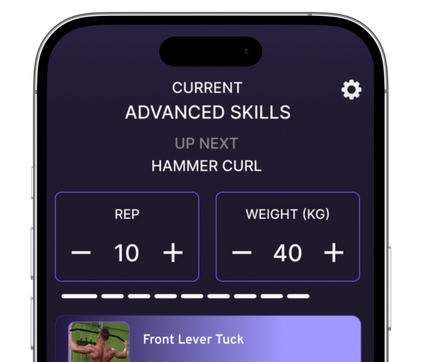
Yeah, ChAIron tops our list and we have our reasons. ChAIron isn't just a calorie tracker. It's an AI-powered fitness coach that tracks your food, adjusts your training, and provides real-time feedback on your form during workouts. Most calorie apps tell you how much you ate.
ChAIron tells you how much you ate and whether it's supporting your training plan, then adjusts your workouts if you're under-fueled or overdoing it.
The AI analyzes your movement 30 times per second during workouts and cross-references your nutrition. If you're losing strength or recovery is tanking, it flags whether you're eating enough protein or overall calories. You can log food through photos, barcodes, or manual entry. The app learns your patterns and suggests meals based on what you actually eat, not generic meal plans.
It also tracks macros automatically and adjusts your targets weekly based on progress: weight, performance, energy levels.
No guessing if you should eat more or less.
People who train seriously and want their nutrition and workouts synced. Lifters, runners, HYROX athletes, anyone doing structured training who's tired of apps that only count calories without context.
Price: 7-day free trial, then subscription (we also have an early-bird offer you can checkout here).
MyFitnessPal has the largest food database: over 14 million foods. That's the main reason it's still one of the top calorie tracking apps in 2026.
The free version covers basic tracking. The premium version adds custom macro goals, meal planning, and detailed nutrition reports.
It makes logging fast. Barcode scanner, recipe import, and meal memory so you're not searching for the same breakfast every day. Also, the progress tracking is solid: weight trends, calorie trends, streak tracking. Seeing a 30-day streak makes you less likely to quit after one bad day.
It also integrates with most fitness apps and wearables, so your exercise calories adjust your daily target automatically.
The free version has ads. Many user-entered foods are inaccurate, so you have to double-check entries.
People who want a simple, proven weight loss calorie tracker app with a massive food library.
Price: MyFitnessPal has a free plan, while Premium starts at around $19.99/month or about $79.99/year, with a higher Premium+ tier at roughly $24.99/month or $99.99/year in the US, varying slightly by region and platform.
If you're asking, "Are calorie tracking apps accurate?" Cronometer is the answer.
Every food entry is verified against USDA, NCCDB, and other nutrition databases. No user-generated guesses. If it's in Cronometer, the data is reliable.
It tracks macros and micros: vitamins, minerals, amino acids, everything. If you're tracking protein down to the gram or want to know if you're getting enough magnesium, this is the app.
The interface is clean. No ads. No social features trying to gamify your eating.
The food database is smaller than MyFitnessPal's because it doesn't allow user entries. If you eat a lot of restaurant food or packaged items not in their system, you'll be doing more manual entry.
Price: Cronometer has a free plan with access to verified food logging, macro and micronutrient tracking, and core features, and an optional Gold (premium) subscription, typically priced around 9.99–10.99 USD per month or roughly 49.99–59.99 USD per year.
If you feel Cronometer is a bit pricey, you can always try ChAIron. ChAIron has all the features of Cronometer and is more cost-effective.

You don't need to pay for a calorie tracker if you're just starting. These free options work well for basic tracking.
Lose It! is one of the top free calorie-tracking apps because it doesn't feel stripped-down.
The free version includes barcode scanning, a large food database, meal planning, and progress tracking. Premium adds custom macros, meal plans, and deeper insights.
The interface is simple. You set your goal and it calculates your daily calorie target. You log food. It tells you how many calories you have left. It also has a social community feature if that motivates you. Most people ignore it, but some find it helpful for accountability.
The free version doesn't let you customize macros beyond the default breakdown. If you need specific protein or carb targets, you'll hit the paywall.
Beginners who want a top free calorie tracker app without paying upfront.
FatSecret is completely free. No premium tier. No ads pushing you to upgrade. It covers the basics: food logging, barcode scanner, exercise tracking, and weight tracking. The food database is solid, though not as large as MyFitnessPal.
No learning curve. You download it, set your goal, and start logging. No overwhelm from features you don't need yet.
It also has a web version, so you can log in from your computer if you're meal prepping or planning ahead.
The interface feels dated compared to newer apps. No AI features, no fancy integrations. Just basic tracking.
People who want a good calorie tracker app free of charge and don't need advanced features.
Price: Free.

If you're an Apple user and want something that integrates seamlessly with Apple Health and Apple Watch, these are the best calorie tracking apps for iPhone.
MacroFactor is built by nutrition coaches and designed for people who care about data.
It uses your actual weight trend, not just the scale number to adjust your calorie and macro targets weekly. If you're losing weight too fast, it raises your target. Too slow, it lowers it.
It's subscription-only, no free version. And the interface assumes you understand macros. If you're brand new to tracking, it might feel overwhelming.
iPhone users who train consistently and want their app to adjust targets intelligently based on real progress.
Price: Subscription (1-week free trial).
Noom is part calorie tracker, part psychology course. It focuses on habit change and mindset, not just numbers.
Daily lessons on behavior change, personalized coaching, and food logging all in one app. It categorizes foods by color: green (eat more), yellow (moderate), red (limit), instead of just showing calories. The Apple Health sync pulls in your steps and adjusts your daily budget automatically.
It's expensive compared to other weight-loss calorie-tracking apps. And the coaching quality varies depending on who you are assigned to.
iPhone users who need accountability and habit coaching, not just a tracking tool.
Price: Subscription (trial available)

Most apps are built for weight loss. If you're trying to gain weight or build muscle, these actually help you eat more instead of less.
ChAIron is the best option for calorie-tracking apps for weight gain because it's the only one that adjusts your food targets based on your training performance.
If you're lifting heavy and your strength is stalling, the app flags whether you're eating enough. If your recovery is slow, it checks your protein intake.
The AI tracks your workouts and nutrition together. You're not just logging food in a vacuum: you're seeing how it affects your training.
It also adjusts your calorie surplus weekly based on whether you're gaining weight at a healthy pace (roughly 0.5-1% of body weight per month for muscle gain without excess fat).
You can set custom macro targets: high protein for muscle, enough carbs to fuel workouts, and the app holds you accountable.
Lifters, athletes, anyone doing structured strength training who needs to eat more but wants to do it intelligently.
Price: 7-day free trial, then subscription
Eat This Much generates meal plans that hit your calorie and macro targets automatically.
You tell it your goal (gain weight, lose weight, maintain), your diet type (keto, vegan, paleo, etc.), and how many meals per day. It builds a plan and even generates a grocery list.
If you struggle to eat enough, having meals planned removes the guesswork. You're not staring at the fridge wondering what hits your target. You just follow the plan.
The free version only gives you one day at a time. The paid version unlocks weekly plans and automatic grocery lists.
People who find it hard to eat enough and want meals planned for them.
Price: Free (limited), or premium subscription.
Short answer: Mostly!
Calorie tracking apps rely on food databases. Those databases have errors: user-entered foods, portion size mistakes, and outdated nutrition labels. Even verified entries have variance. A medium apple might be 95 calories or 120, depending on size and variety. Restaurant meals can be off by 20-30% because portions aren't standardized.
The most accurate calorie-tracking apps can't fix poor logging. If you're guessing portions or skipping snacks, no app will give you accurate data. But if you log honestly and consistently, even imperfect data is useful.
You'll see trends: am I eating more or less than I think? Is my weight moving in the right direction?
Accuracy matters less than consistency. If you log everything the same way every day, you can adjust based on results, even if the numbers are slightly off.
If your weight isn't moving after two weeks, eat 200 fewer calories. If you're losing too fast, add 200. The app gives you a baseline.
Your body gives you feedback.
Q: What is the best app for tracking calories?
ChAIron is the best overall because it syncs your nutrition with your training and adjusts both based on real progress. If you just want simple calorie counting, MyFitnessPal or Lose It! work well.
Q: What is the best free calorie tracker app?
Lose It! offers the most features for free, including barcode scanning and meal planning. FatSecret is completely free with no premium upsells.
Q: Are calorie-tracking apps accurate for weight loss?
They're accurate enough if you log your food consistently and weigh it accurately. The key is to use them to spot trends, not to expect perfect precision on every entry.
Q: Which calorie tracking app is best for weight gain?
ChAIron adjusts your calorie surplus based on training performance and recovery. Eat This Much is good if you want automatic meal plans that hit your targets.
Q: What is the best calorie tracker app for iPhone?
MacroFactor has the best Apple Health integration and adapts your targets based on your actual weight trend. ChAIron also works seamlessly with iOS and syncs with Apple Watch.
The best calorie tracking app depends on your goal.
If you train seriously and want your nutrition and workouts connected, not tracked separately, ChAIron is the top pick. It's the only app that adjusts both your food targets and your training based on how your body is actually responding.
Try it free for 7 days and see if syncing your calories with your performance makes a difference.
.png)
.png)